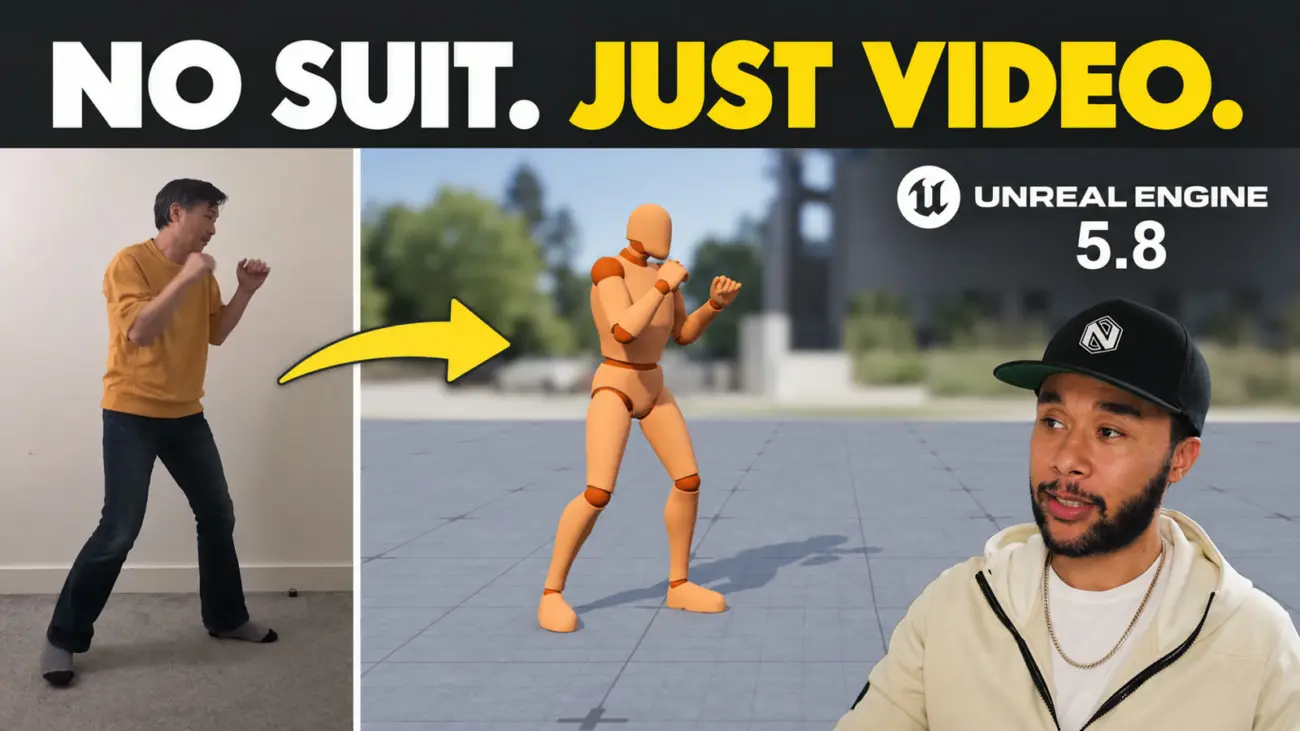
One phone, propped up in a bedroom, pointed at a plain wall. That is the whole capture setup. The same performance is in Unreal Engine 5.8 a few minutes later, retargeted, trimmed and firing in gameplay when you press the attack button. No suit, no markers, no stage.
I have shot motion capture for studios all over the world and the price of admission never changed. Book the volume. Hire the crew and the actors. Pay for the clean-up, which is where the budget usually goes. Epic has now put markerless motion capture in the engine, for free, as part of MetaHuman Animator. So Alex Moon and I tested it the way a studio would: capture a move, clean it, put it in a game, and say plainly what it got wrong.
Epic sponsored the video this article supports. They asked for our honest opinion and did not see the questions in advance. What follows is what we found.
Alex is a principal animator with twenty years in games. He has shot mocap, cleaned mocap, and these days animates almost everything in engine with Control Rig. He led the demo. I interrupted when it got too technical and when I disagreed. The full video is at the bottom of this page, and every file Alex used is available to download so you can follow along one to one.
What you need before you start
Four things, all free. The markerless capture shipped with 5.8 in June 2026, the sample project is where every chooser and pose search database in this article already works, and Alex’s files let you follow along with his exact clip before you film your own.
Windows only for the processing. It runs on your own machine, nothing is uploaded anywhere.
Step 1. Capture a performance from one video
Alex filmed himself doing a two-hit combo. Two takes, one clip, nothing else. The route into Unreal is four clicks:
Open Live Link Hub and switch it to Capture Manager.
Choose Mono Video Ingest and point it at the folder with your clip.
Add the clip to the queue and press Start. It took under a minute.
In the content browser you now have a capture folder. Create a MetaHuman Performance asset, assign the capture to it, turn facial animation off, turn body tracking on, pick any MetaHuman as the target and press Process.
Live Link Hub to Capture Manager to Mono Video Ingest. Under a minute.
The performance lands on a MetaHuman first, not on your game character, and that is by design. The solver needs a known body to fit the video to. The MetaHuman is that reference skeleton. You move it to your own character in the next step, so do not fight it.
Facial off, body on, press Process. The phone clip on the left, the MetaHuman on the right.
When the processing finished, Alex said what I was thinking: the data looks remarkable for something that came off one phone clip. No sliding feet, the poses hold, the timing is his. It is the most accurate video-to-animation result I have seen, and it lands on a skeleton that is already in the engine, which is the part that saves you a day.
Shoot it the way Alex shot it
The whole setup. Plain wall, clear floor, dark clothes, one phone.
Look at his clip before you record your own. Plain wall. Nothing on the floor. Dark clothes. Those three things are the difference between clean data and a clean-up job, and it is true of every system that solves from video, not only this one. White clothes against a white wall in a cluttered room will give you noise, and you will spend the afternoon removing it.
Fingers are captured too. They are not finished, but they are usable: fix the main poses, drop a pose layer on top of the raw data, and the hands come good.
Step 2. Clean it up, in stages
Raw is not the same as usable. Mocap gets cleaned in stages and the first stage is deliberately light: change as little as you can, get it running in the game, and only then decide what needs real work.
Export and retarget. Export the performance as an animation asset. The sample’s gameplay runs on the UEFN mannequin, so right-click the asset, choose Retarget Animation, pick the UEFN mannequin as the target mesh and generate the retarget. When you export, swap the MHC prefix for UEFN in the name. Naming matters here more than it looks, because you are crossing a bridge: the MetaHuman side of Unreal gives you the performance, the UEFN side gives you Control Rig and gameplay. If your character is already a MetaHuman you skip this. Everyone else does it once, and then it is a template you reuse.
Retarget Animation, target the UEFN mannequin, generate. Once, then it is a template.
If you have your own character, this is the moment to pause and use it. Watching your own model do a move that you filmed in your bedroom is where the tool stops being a demo.
Trim and rotate. Alex’s clip had both takes in it. He kept the second, deleted the walk-in and the walk-out, and set keys so the clip holds one action. Then the nitpick that makes people decide a tool is broken: the capture comes in facing one axis and the project wants another. Key the root, rotate it 90 degrees, key it again. Thirty seconds. People give up at exactly this point, so I am telling you now.
One take kept, walk-in and walk-out gone, root rotated 90 degrees. The step people quit on.
Step 3. Put it in the game, then find out what the game is playing
This is the part I most wanted to see, because it is the real skill in game animation and it has nothing to do with capture. When you hit an enemy in the sample, which animation fired, and where does it live?
Alex used the Rewind Debugger. Record a bit of gameplay, land a hit, scrub back, and it tells you the exact asset. From there the trail runs through a chooser table to a pose search interaction asset, which holds two sets of data: one for the attacker and one for the victim. The attacker’s montage is the one you replace. Leave the victim alone until the attack is right, and do not change the distance between the two characters unless you have to; the reaction only feels good because the logic already agrees on where they stand.
Record a hit, scrub back, follow the trail: Rewind Debugger, chooser table, pose search asset.
If you have not used the Rewind Debugger, start today. The sample is full of logic Epic built so that pressing the stick feels good, and the debugger is how you learn what comes first, second and third. The more you use it, the faster you understand why things stick.
Alex opened the attacker’s animation montage, swapped the animation for his combo, saved, and pressed attack. It played. First time.
The five frames
Then the honest bit. The original attack landed its hit on frame 19, and the sound and the hit reaction are keyed to that. Alex’s capture lands on frame 14. So the sound fires late and the victim reacts to a punch that has already passed. That is not the capture’s fault. His performance was never going to land on the frame a designer picked months ago. Closing that gap is the job, and no tool is taking it from you. The second stage of clean-up is exactly this: make the animation fit the logic that already works, rather than bending working logic to fit the animation.
The swap, then the gap: the old hit on frame 19, the new one on frame 14.
Why we both fix it in Control Rig now
Alex bakes the animation onto the Control Rig and edits timing and pose without leaving Unreal. I work the same way, and we agree on why: it is faster, because you see the result immediately.
That is the whole argument. The moment you leave the engine you lose the enemy, the collision and the reaction. In Maya you have a clean curve editor and no game. In the engine you see the hit land, against the character it lands on, with the logic that fires it. What you see is what fires. Alex has worked this way since Control Rig arrived and the tools keep getting better; I came to it later and would not go back.
Bake to Control Rig. Timing and pose fixed in engine, and the reaction lands.
He moved the first hit earlier, pulled the knee kick to about frame 14, tidied the poses, and played it. Now the sound, the strike and the reaction agree. Then the change that alters your day: because Sequencer is linked to the animation asset, he turned the straight kick into a knee kick, saved, walked up to the enemy and pressed attack. It was in the game. No export, no import, no round trip. Disable the layer and you have the before; enable it and you have the after. Changing a move twenty times is what makes it good, and twenty round trips through an FBX is why nobody does.
Change the kick in Sequencer, save, it is in the game. Disable the layer to compare.
My verdict, the honest version
I have reviewed animation in big studios for a long time, so here is how I would file this.
For a AAA team, today, this is a preview tool. It proves your systems work with real motion, and it proves your motion works with the systems, before anyone books a stage. A bridge to the final asset, not the final asset.
For an indie or AA team that needs believable movement and has never had access to capture, it lands hard. The quality is high enough to ship for many games.
For any team with animators who are good at clean-up, the raw data does not have to be perfect, because they will take it somewhere more stylised anyway. It is a better starting point than keyframing from nothing.
Where it is not ready is replacing a volume. Two actors, a wide space, long interacting performances: that still needs a stage, and a suit from Xsens or Rokoko may still edge it on a single body. Professional setups keep the lead performance with a director in the room.
What went away is the floor. The thing that stopped you was never talent, it was access. You could not get decent capture without a building and a budget, so you keyframed and hoped. Now the capture happens inside the engine, on the skeleton you ship, and you can prove a system works before spending anything. Everyone else on a game spends ninety percent of their day in the engine. Animators finally can too. That is the win for me, and Alex agrees.
Would I recommend it? Yes, depending on your circumstances, and the circumstances are generous. It costs you an afternoon.
Is MetaHuman Animator markerless motion capture free?
Yes. It ships with Unreal Engine 5.8, released in June 2026, at no extra cost, and commercial use is allowed under the standard Unreal licence.
Do I need a mocap suit or markers?
No. One video of a person from a single camera is enough. Alex Moon recorded the demo in this article on a phone against a plain wall. A plain background, a clear floor and dark clothing give the cleanest data.
What does it capture?
Body, face and fingers from one camera. In the demo we turned facial capture off and kept body tracking on. Fingers come through usable but not finished, and are tidied with a pose layer.
Does it run in the cloud?
No. Processing runs on your own Windows machine inside Unreal Engine. Nothing is uploaded.
Why does the capture land on a MetaHuman instead of my character?
The solver needs a known reference body. The MetaHuman is that skeleton. You retarget the result to your own character afterwards with the IK Retargeter, once, and reuse the setup.
Is it good enough to replace a mocap studio?
For single performers and gameplay moves, often yes, especially for indie and AA teams. For two actors interacting across a wide space, or a lead cinematic performance with a director in the room, a stage is still the right tool.
Follow along
Download the sample project, then Alex’s clip and both FBX files. Combine the two and you get the result in the video. Once you have done it once with his clip, you will start thinking about what you could film yourself, which is the point.
If you want to go deeper on animating inside Unreal, Alex Maniotis teaches the full production workflow in Unreal Animation Unlocked, and there are free rigs here if you would rather start by keyframing.
Watch the full breakdown
Alex’s channel is linked in the video description, and the long version of his demo is there too. My question for you, and I read the comments: what would you capture with your phone first? Not what you would make eventually. What would you shoot this weekend?
About Harvey Newman
I’m Harvey Newman, an Animation Director and game developer with over a decade of experience working across AAA and indie studios. I’ve contributed to titles like Star Wars Battlefront II, Battlefield V, Horizon Zero Dawn, and Dune Awakening, and I’ve spent a lot of time on both sides of the hiring process, creating animation and reviewing showreels.
Alongside studio work, I run Anim.works and create courses, tools, and content focused on helping game animators understand what actually matters in production and recruitment. My approach is straightforward and experience-led, no fluff, just practical guidance based on how studios really work.
Alex Moon and I captured a two-hit combo from one phone clip, cleaned it in Control Rig and fired it in gameplay with MetaHuman Animator in Unreal Engine 5.8. The free plugin, the honest verdict, and his files to download.
Keyframe is now FrameSide. Why we renamed our free animation review tool, and a tour of the rebuilt Animworks homepage: live numbers, three doors, real best sellers, and a page for studios.
Silhouette is the first language of animation. A pro game animator breaks down line of action, weight, negative space and the workflow behind poses that read instantly.