


Squarebit Subdivs
FreeUnreal





Crowd City LibraryThe Wild West LibraryHalloween LibraryAll Mocap


Demo Reel WorkshopCrafting a ShowreelFacial Animation Boot Camp





AS_ConstraintFinder by AnimStarter is a constraint manager for Maya. Select any object or group, hit refresh, and every constraint on it is listed in one panel. Select the driver in one click, delete constraints one by one or all at once, and inspect referenced rigs without the risk of deleting their constraints. Built by an animator with over 15 years in the industry, for the moment you inherit someone else's scene.
 Maya
MayaInstant download Vetted creator
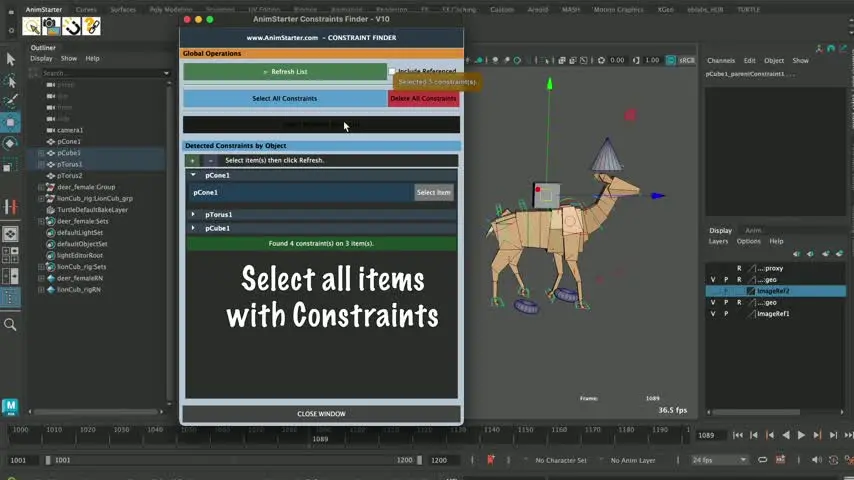
No more digging through the outliner, the channel box and the connection editor. Select the object or group, hit refresh, and every constraint on it is listed.
Click Select Driver and the parent or target object doing the controlling is selected straight away.
The script detects constraints on referenced nodes and locks them from accidental deletion, while still letting you inspect them.
A lightweight UI that pops up when you need it and stays out of your way the rest of the time. AnimStarter built it for real production scenes, where you are debugging a rig before blocking, cleaning up a vendor scene or working out what a previous animator left behind.
Every constraint on the selected objects, in an organised panel.
Select one object or a whole group of objects, then refresh.
Highlights the parent or target object that is doing the controlling.
Constraints on referenced nodes are locked from deletion but stay inspectable.
Remove individual constraints from the list.
Select every listed constraint at once, or wipe them in one action when you need a clean slate.
Drag INSTALL_AS_ConstraintFinder.mel into the Maya viewport.
Close and reopen Maya so the shelf loads.
AS_ConstraintFinder lives on the AnimStarter shelf, ready to go.
No reviews yet
No reviews yet. If you have used it, you would be the first to say so.
Used this in a shot? Your notes help the next animator decide.
Sign in to reviewEvery plugin on Animworks is checked by our team before it goes live.
Questions and bug reports go straight to AnimStarter, or email support@anim.works.
It lands in your downloads the moment you check out, and stays there.
 Review shots frame by frame
 Rigs, tools, courses and mentors
Current
Rigs, tools, courses and mentors
Current
 Boards and story beats
Coming soon
Boards and story beats
Coming soon