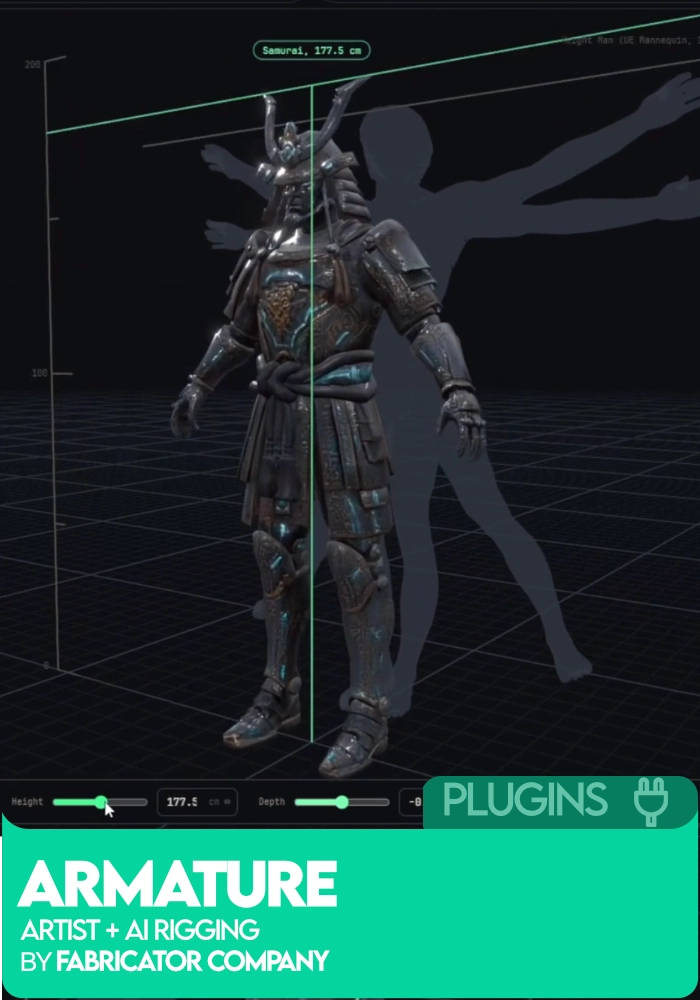






Armature: Artist+AI Rigging by Adrian Melian
Armature by Adrian Melian (FabricatorStudio) is a standalone AI character rigging and skinning application for Windows. Load a character mesh (USD, OBJ, FBX, GLB, glTF), fit proportions, assemble a skeleton from modules or a template, generate skin weights in one press, and export as a single USD file with mesh, skeleton, weights, and Control Rig build data. Ships with a Maya Control Rig builder. Runs fully locally, nothing goes to the cloud. Free for indies and commercial work under $100k a year.
By Adrian Melian (FabricatorStudio).
Free
Free for personal, learning and portfolio work, and for commercial use while your revenue is under $100k a year.
Get it freeFor studios and artists above $100k a year. Pay once per artist, yours outright, no subscription.
Buy commercial- Free for personal, learning and portfolio work.
- Free for commercial use while your revenue is under $100k a year.
- Above $100k a year: one payment per artist. No subscription, no expiry.
- Includes updates.
- Studios and larger teams: volume seats and invoice billing, get in touch.
Built for Your DCC and ready to drop straight into your animation workflow.
Designed for real-world animation workflows, from blocking to final polish.
Armature: Artist+AI Rigging – Standalone AI Character Rigging and Skinning Software by Adrian Melian (FabricatorStudio)
If you’ve ever finished modelling a character and then realised the rigging pipeline was going to eat the next three weeks of your life, Armature is the tool that finally solves it. It’s a standalone Windows application for AI character rigging and skinning, built by Adrian Melian (FabricatorStudio) after fourteen years in the game industry at Sledgehammer, Camouflaj, Double Fine, Ubisoft, and NCSoft. The pitch is deliberately clear: speed for the devs, depth for the artists. Press one button and get a rig you can start blocking on. Push further when you need a production-grade result.
What makes Armature different from the current wave of AI rigging tools is that it isn’t a black box. The AI half takes a mesh to a working rig in minutes. The human half is a full set of professional rigging and skinning tools you’d expect from a proper DCC. Every stage carries both, so you never hit a ceiling where the automation runs out and you’re stuck.
What Armature does
Armature turns a character mesh into a rigged, skinned, animation-ready asset without needing Maya or Blender. It runs as its own standalone Windows application, and hands finished work off to whichever package you actually animate in.
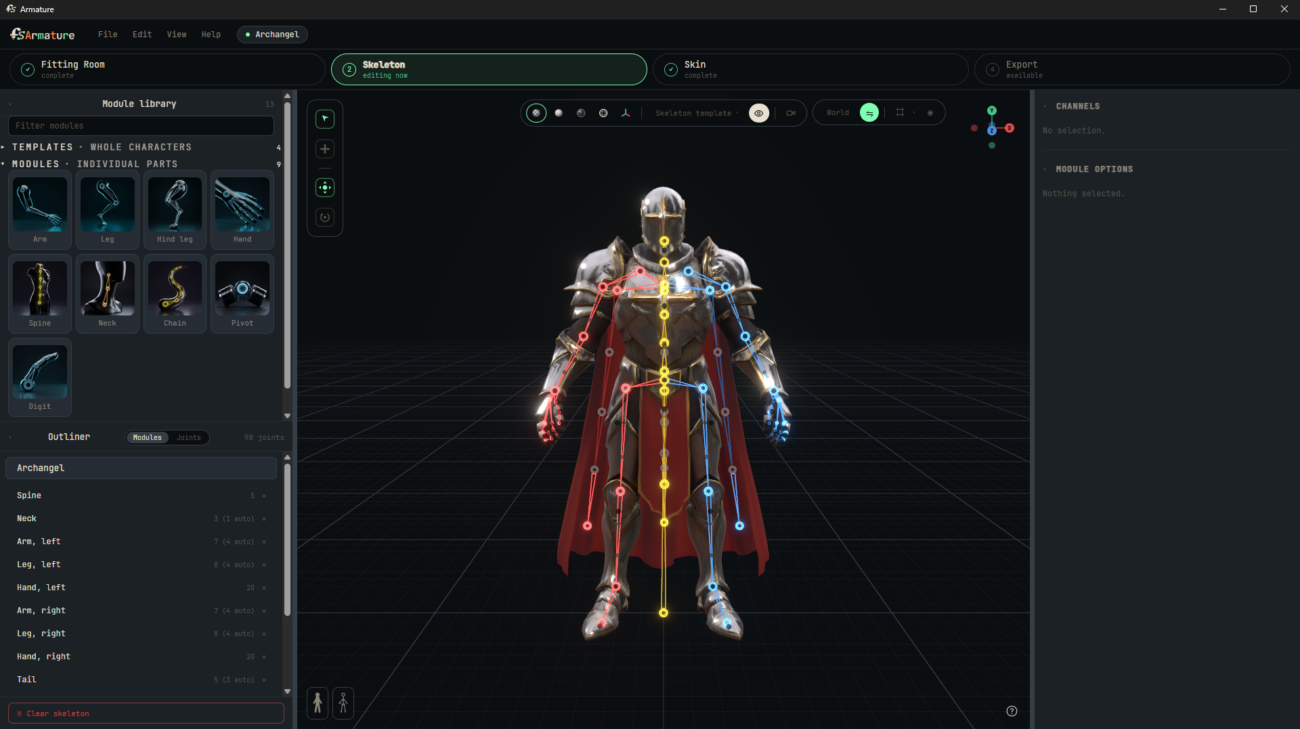
Load a mesh as USD, OBJ, FBX, GLB or glTF. Fit the proportions against a height reference. Assemble the skeleton from modules (biped, quadruped, arm, leg, hand, spine, neck, chain, pivot, digit) or start from a whole-character template. Generate the skin weights in one press. Then paint them by hand if you want to, using a full weight-painting suite with layers and non-destructive passes.
Everything leaves as a single USD file carrying the mesh, the skeleton, the weights, and the control rig build data. A Maya control rig builder ships alongside so what you export can arrive in Maya as something you can animate, not a bare skeleton. An Unreal control rig builder is in active development.
Why AI character rigging with Armature beats the alternatives
High-end character rigging has traditionally lived inside expensive applications. If you’re an indie who can’t justify a Maya subscription, or a veteran rigger who just wants to move faster on the setup grunt work, Armature closes that gap. The floor is low: drop in a mesh, press generate, hit play. The ceiling isn’t: layer masks, mirroring, weight layers, and pre-export validation give you room to push to a production bar.
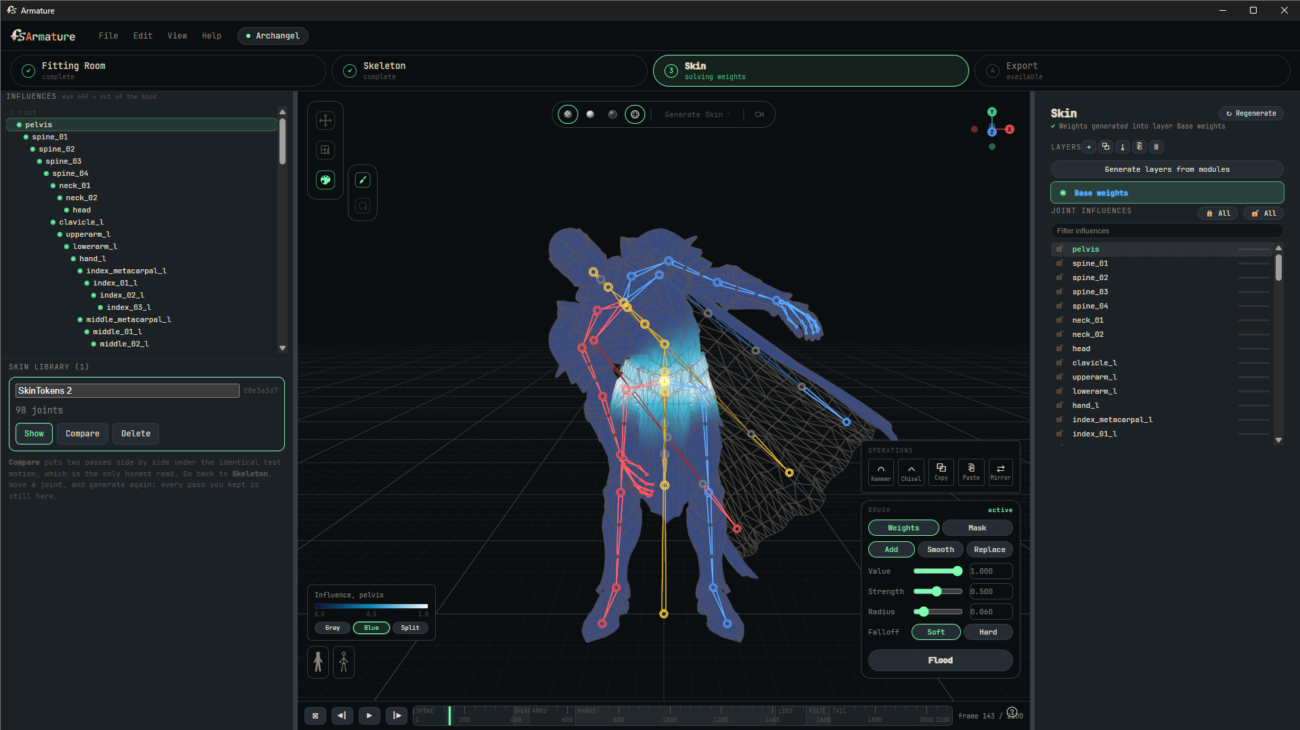
The skin toolset in particular has real depth. Weight layers, masks, mirroring across the centre line, and two verbs worth knowing: Hammer melts a patch into the surface around it. Chisel carves it rigid and sharpens its boundary. Same motion, two targets, opposite results. Armour plates want chisel, cloth under them wants hammer. Once you internalise that you’ll wonder how you lived without it.
The five-stage Armature workflow
1. Load
Drop in your character mesh. Armature reads USD, OBJ, FBX, GLB, and glTF. Recent characters list surfaces so you can jump back into an in-progress rig.
2. Fit
The Fitting Room orients and sizes the character against a height reference so symmetry and joint placement behave predictably downstream. Get the proportions right here and every stage after is easier.
3. Skeleton
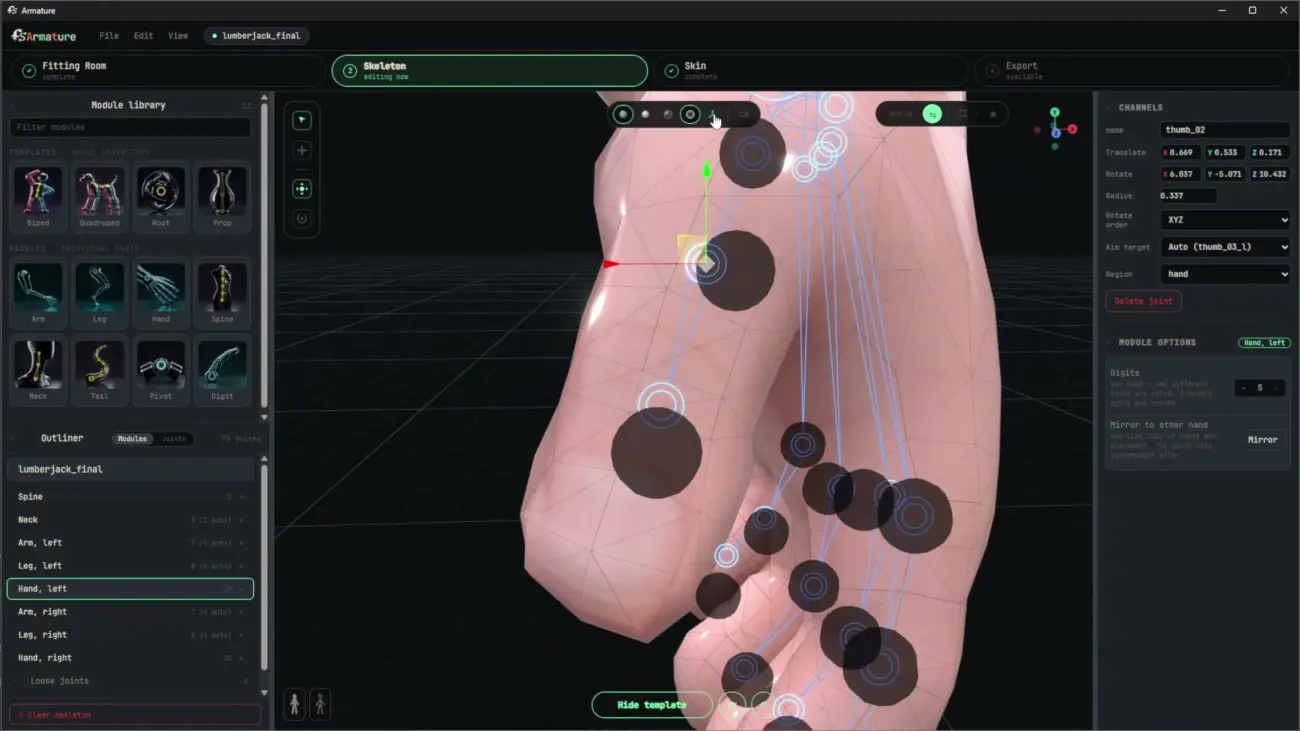
Start from a biped, quadruped, or prop template, or build from nothing using the module library (arm, leg, hand, spine, neck, chain, pivot, digit). Live symmetry means you place one side and the other mirrors. Limb duplication, chain editing, and a finger count you specify explicitly instead of the machine guessing.
4. Skin
Two local skinning engines. One solves on any machine in seconds and needs no GPU. The AI one runs on your GPU for the best possible weights. Then a full painting suite takes over: layers, non-destructive passes, masks, mirroring, and the hammer / chisel brushes for cleanup.
5. Export
One USD file carrying mesh, skeleton, weights, and Control Rig build data. Pre-export validator runs safety checks so nothing bad ships. In Maya, the free FabricatorStudio toolset reads your Armature export and builds the control rig for you. Same character can come back in for new weights and go out again years later.
Key features of Armature AI Rigging
- Standalone Windows application with no Maya, Blender or Python install required
- Reads USD, OBJ, FBX, GLB and glTF so it fits into any character pipeline
- Modular skeleton assembly with a template and module library (biped, quadruped, arm, leg, hand, spine, neck, chain, pivot, digit)
- Two skinning engines: instant CPU solver for any machine, plus an optional local AI solver for best-quality weights on your GPU
- Full weight paint toolset with layers, masks, mirroring across the centre line, and Hammer / Chisel brushes
- Rig validator with pre-export checks so nothing broken ships to the animator
- Single-file USD export carrying mesh, skeleton, weights, and Control Rig build data
- Also exports GLB plus rig data as JSON
- Maya Control Rig builder included (free FabricatorStudio toolset)
- Unreal Control Rig builder in active development
- Live locally – nothing is uploaded, nothing is processed in the cloud
What Armature is great for
- Indie game developers who need production-quality character rigs without a Maya subscription
- Solo animators tired of waiting on someone else to rig their characters
- Veteran riggers who want to move faster on the setup grunt work
- Students learning character rigging with proper professional tools
- Freelance animators building portfolio pieces with custom characters
- Small studios needing an efficient rig pipeline that plugs into Maya and Unreal
- Technical artists building batch rigging workflows for large character rosters
- Anyone rigging biped, quadruped, or non-humanoid creatures with modular skeletons
AI rigging plus human control
The distinguishing thing about Armature is that the AI does not replace the artist. It handles the parts that used to eat your day (initial skin weights, symmetric skeleton placement, mesh orientation) and leaves everything meaningful to you. Weight layers are non-destructive. The paint suite is proper. You can override any part of the automation without breaking the rest.
The AI skinning solve runs on your own machine. Nothing is uploaded and nothing is processed in the cloud. Your character data stays on your hard drive.
Pipeline and file compatibility
- Input formats: USD, OBJ, FBX, GLB, glTF
- Output formats: USD (primary, single-file with rig data), GLB, JSON (rig build data)
- Maya integration: free FabricatorStudio Maya toolset builds the Control Rig from Armature’s export data
- Unreal integration: Control Rig builder in development, USD export currently imports cleanly into Unreal
- Blender: USD import supported natively in Blender 3.5+
- Godot, Unity, other engines: USD, GLB, and FBX-friendly workflows
Pricing
- Indie (Free): for personal work, learning, portfolio pieces, and commercial work under $100k a year. If you qualify for Maya Indie, Armature is free.
- Commercial ($149 per seat, one time): for studios at or above $100k a year. Includes a year of updates and a 14-day refund window.
Downloaded and licensed directly through fabricator.studio/armature.
System requirements
- Platform: Windows (macOS and Linux not currently supported)
- Built-in skinning engine: runs on any machine, no GPU required, no extra download
- Optional AI skinning component: roughly 9 GB, requires an NVIDIA GPU with 6 GB VRAM or more
- Install note: Windows SmartScreen will show a “Windows protected your PC” warning on first run since Armature is a new publisher. Click More info, then Run anyway.
About the creator
Adrian Melian is the technical artist behind FabricatorStudio, based on fourteen years in the game industry. He joined Sledgehammer Games as a Senior Technical Artist on Call of Duty: Vanguard and was promoted to Lead for Modern Warfare III, where he led both the Character Tech Art team and the Weapons Tech Art team. Before and after Sledgehammer: Camouflaj, Double Fine, Ubisoft, and NCSoft. The free Maya pipeline that Armature slots into is already public at fabricator.studio. Armature is that same body of work rebuilt for people who don’t have Maya.
Frequently asked questions
What is Armature: Artist+AI Rigging?
Armature is a standalone Windows application that turns a character mesh into a rigged, skinned, animation-ready asset using AI-assisted rigging and skinning. It’s built by Adrian Melian (FabricatorStudio) and outputs directly to USD, GLB, and JSON so the result drops into Maya, Unreal, Blender, and any other pipeline that reads those formats.
Do I need Maya or Blender to run Armature?
No. Armature is a completely standalone application. It doesn’t require Maya, Blender, Python, or any other DCC to be installed. It runs on its own and hands finished rigs off to whichever package you animate in.
What file formats does Armature support?
Input: USD, OBJ, FBX, GLB, glTF. Output: USD (single-file with mesh, skeleton, weights, and Control Rig build data), GLB, and JSON rig data. The USD export imports cleanly into Unreal and Maya, and a Maya Control Rig builder is included in the free FabricatorStudio toolset.
Is Armature free?
Yes for indies. Free for personal work, learning, portfolio pieces, and commercial work under $100k a year. Above $100k a year it’s $149 per artist as a one-time purchase with a year of updates and a 14-day refund.
Does Armature use cloud AI or run locally?
Fully local. The AI skinning solve runs on your own machine. Nothing is uploaded and nothing is processed in the cloud. Your character data stays on your hard drive.
What are the system requirements?
Windows-only for now. The built-in skinning engine runs on any machine with no GPU required. The optional AI skinning component is roughly 9 GB and needs an NVIDIA GPU with at least 6 GB of VRAM.
Can I use Armature for commercial projects?
Yes. Free for commercial work under $100k a year (same threshold as Maya Indie). At or above $100k a year the licence is $149 per seat, one time, with 14-day refund and a year of updates.
How does Armature compare to Mixamo, AccuRig, and other auto-riggers?
The main difference is depth and control. Mixamo and similar tools focus on speed with limited customisation. Armature gives you the same speed on the initial pass, but layers a full professional rigging and skinning toolset on top so you can push to a production-grade result. It also runs entirely locally, exports USD as a first-class citizen, and integrates with the free FabricatorStudio Maya Control Rig builder.
Armature: Artist+AI Rigging by Adrian Melian (FabricatorStudio).
| License | Free, Commercial |
|---|
You must be logged in to post a review.

Reviews
Clear filtersThere are no reviews yet.