









Crowd City LibraryThe Wild West LibraryHalloween LibraryAll Mocap


Demo Reel WorkshopCrafting a ShowreelFacial Animation Boot Camp





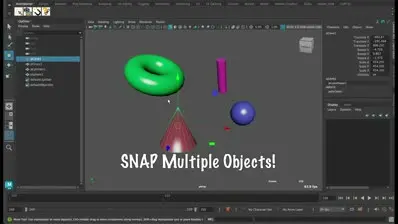
Snap Tool by AnimStarter (AS_Snap) is a one-click magnet for Maya. Select a target, then any number of children, hit the button, and they all snap to the target's position and rotation in 3D space: no constraints, no menus, no setup. Built by a senior 3D animator who has used it every day on feature film work for years. For anyone who wants a quicker Maya snap mid-blocking.
 Maya
MayaInstant download Vetted creator
Constraints, snap to point, parent then unparent: all of it stops you mid-blocking. AS_Snap lands a control exactly on top of another in one click.
Select the target first, then as many children as you like, and every one of them snaps to the same position and rotation together.
No constraints are left behind and nothing needs setting up first, so your scene stays clean. Just select and click.
This is not a script thrown together over a weekend. It was built by a senior 3D animator who has used it daily on feature film work for years, and it behaves the way you expect a snap tool to. Small wins like these add up across a day of animating.
Children snap to the target's position and rotation in 3D space.
Snap one object or a whole selection in the same click.
Put a hand exactly where the prop is while blocking a shot.
Line up an IK control, or match pivots between rigs.

Drag INSTALL_AS_Snap.mel into the Maya viewport, the same drag-and-drop setup AnimStarter uses across its shelf.
Close and reopen Maya so the new tool loads.
AS_Snap sits on an AnimStarter shelf, ready to use.
No reviews yet
No reviews yet. If you have used it, you would be the first to say so.
Used this in a shot? Your notes help the next animator decide.
Sign in to reviewEvery plugin on Animworks is checked by our team before it goes live.
Questions and bug reports go straight to AnimStarter, or email support@anim.works.
It lands in your downloads the moment you check out, and stays there.
 Review shots frame by frame
 Rigs, tools, courses and mentors
Current
Rigs, tools, courses and mentors
Current
 Boards and story beats
Coming soon
Boards and story beats
Coming soon

