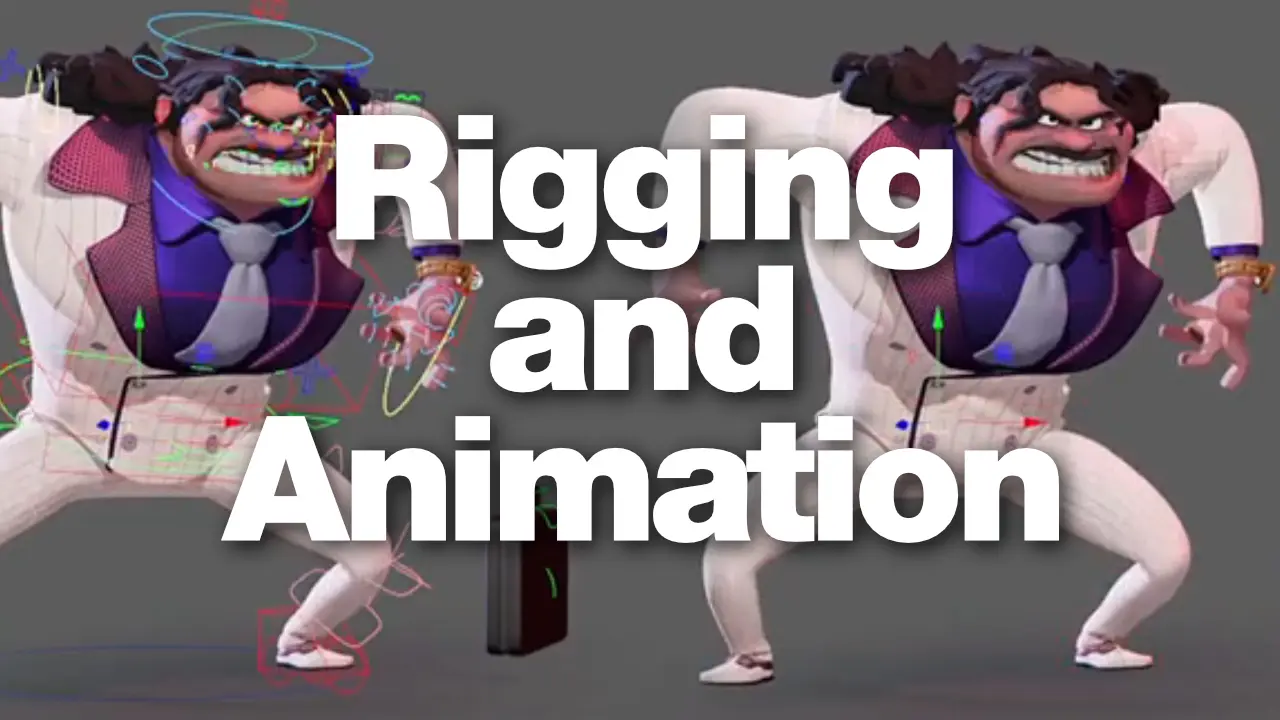
Rigging and Animation

0
Lead animator managing the rigging and animation pipeline between departments on a game production

Rigging and Animation: a Symbiosis

On a production, the animation department is going to spend a meaningful amount of time interacting with the rigging/TA department. As a lead or senior, most, if not all of that falls on you. You’re the one routing feedback from your team, choosing what actually needs to go to rigging versus what can be solved in the scene, and making sure the requests that do go out are clear enough to be acted on. How well that pipeline runs is, more often than not, a reflection of how you manage it.

Here’s what I’ve learned about making it go well.


Early Communication is Key

Most studios are working from a rig template, and the rigger isn’t starting from scratch every time. A humanoid character comes with a set of assumptions already baked in: bipedal locomotion, standard joint ranges, the usual IK/FK setup on limbs. You don’t need to walk your rigger through any of that. They already know.

What they may not know, and what they need to hear from you before their work starts, is anything that falls outside the standard template. If a character has a shot where the leg needs to extend well beyond its natural range to sell a kick from a specific camera angle, that may not be something a template accounts for. If there’s a sequence which requires an unusual constraint setup, or a prop interaction that’s going to put pressure on controls in a way that isn’t obvious, say so early.

The cost of that conversation at the start of a rig is low. The cost of bringing those requirements up after your animators have started is considerably higher, and it usually falls on everyone: the rigger has to retool something that’s already been released, or your animators may have to revisit shots, and you’re managing that scramble on top of everything else.

If you know a requirement is unusual, treat it as urgent information. Get it to the rigger before the build starts, not after.


Cross-Pollination

A lot of the best riggers have animated, or at least know how to animate, much like many of the riggers featured on anim.works. They understand what it feels like to fight a bad rotation order in the graph editr, or the difficulty in getting an arc right because there are no options to switch parent-space. That shared experience changes how the conversation goes. When you’re talking to a rigger who has spent time on the animation side, you don’t have to translate as much. You can describe a problem in animation terms and they’ll clearly understand what the animators need.

And it goes the other direction too. Animators who have some rigging knowledge tend to give better feedback. Not because they can solve rig problems themselves, but because they can describe what’s happening with more precision. They know whether they’re hitting a weight issue, a control range problem, or something in the constraint setup. That specificity pays off.

If you have animators on your team who want to poke around in rigging on their own time, encourage it. And if you have access to riggers who want and are able to sit with animation, make that happen. The cross-pollination of skills truly improves the working relationship, and it shows up in both the quality of the rig and quality of the animation.

Going a little deeper into the topic: you don’t need to know how to build a rig. But as the person fielding requests from your team and routing them to rigging, it helps to know roughly how things work under the hood.

When someone on your team says “the spine bendsweird,” your job is to get closer to the actual problem before it goes to the rigging team. Are the joint orientations on the fingers a bit offset? Is the center of the pelvis making hip rotations feel strange? The more you can tighten the description, the more useful the request becomes.

Riggers are problem-solvers. Give them a clear picture of the issue as well as the result you’re after and they’ll generally find a path there. What slows things down is when the request leaves all the interpretation on their side. Sure, “this doesn’t feel right” is a starting point. “We’d like the pole vector to move with the arm IK rotation” is something they can actually work with, right away.

Like with all communication, we are trying to illustrate or paint a picture in the listener’s mind. The more colors we use, the more details we can draw, the clearer that picture will be which brings us all closer to a solution.


Reproduce Then Report

When your team surfaces a bug, your job before it goes to rigging is to make sure it’s reproducible and described well. A rigger cannot efficiently fix “the hand looks weird sometimes.” They can fix “when the forearm hits about 140 degrees of rotation, the wrist starts to flip.”

Isolate the condition, what pose triggers it. What range of motion causes it. A screenshot helps. A short recording helps even more. A scene file with a pose that shows the problem is better still. The less time the rigger spends hunting for the issue, the more time they spend solving it.

Also be clear about severity. If something is only happening in a range that might not appear in every shot, note that. If it’s visible in every setup your team is working with, say so. Riggers are sometimes managing requests from multiple projects, multiple assets, all at once, and helping them understand what’s blocking work versus what’s a lower-priority request makes their prioritizing easier and gets your team unblocked faster.


Stay Within the Boundaries of the Character

Every rig has an intended range. Not usually a hard wall, but a zone where the character reads correctly and the controls behave predictably. Outside of that zone, you can start running into geometry that was never weighted for a given pose, controls that don’t react the way you’re pushing them, etc.

Part of your job as a lead is knowing the difference between a rig that needs to be adjusted or a pose that needs some tuning. Those are two separate problems. Conflating them can generate unnecessary requests and puts your team in a reactive loop.

If your animators are regularly hitting a limit that’s getting in the way, bring it to your rigger as a conversation, not a complaint. They may be able to extend the range. They may also explain why the limit is there, and you’ll both work out another way to get what you need. Either way, you’re solving the right problem, especially if it cropped up more than a few times.


Get Context

One of the more frustrating things from a rigger’s perspective is chasing down a reported bug that turns out to be something introduced in the animation scene. Animators work in different ways, and sometimes, they use controllers and/or built-in rig settings in ways that are not aligned with the technical design.

When you’re collecting feedback from your team, make a habit of asking whether anything changed in the scene before the problem appeared. Ask them to walk you through how the issue came up and include all of that info in the report. It’s not an accusation, it’s just context, and it’s often the fastest path to a solution.

When going through the problem with the animator, you’ll be able to figure out whether it’s an issue with the rig, or with the animator’s workflow/usage of the rig.

This leads to the next topic:


Know Your Rigs

One of the more underrated parts of being a lead is doing the work of understanding the rig before your animators are deep in production. Not just reading the documentation (if there is any), but actually getting into the controls, pushing things around, and seeing where the limits are.

If schedule allows, animate something with it. A locomotion cycle, a simple action, even just a handful of poses. You don’t need to produce anything final. The point is to develop a feel for how the rig works, where it starts to show any cracks, and what kinds of poses are going to require extra care. That hands-on time pays huge dividends if your animators start hitting problems, because you’ll have a much better sense of whether what they’re describing is a rig issue or something that can be solved in the scene.

The difference in raising a ticket versus fixing it in-scene is important. Every ticket that goes to rigging has a cost, in time, in back-and-forth, in the attention it pulls away from whatever else the rigging department is building or fixing. It could also block the work the animator, or other animators, are working on. Some of those tickets are completely necessary. Others are problems that an animator was close to solving, or has a workaround that just wasn’t obvious yet. A lead who knows the rig well enough to tell the difference is extremely useful to both departments.

It also makes you a better resource for your team. When someone comes to you with a problem, you can sit down with them and actually work through it rather than just routing it upward. Sometimes, you can get your animator unblocked in just a few minutes, and that’s a much better outcome for everyone.

The time investment up front to get to know your rig is real, and not every production schedule makes it possible. But if there’s any room to carve it out, take it.


Respect What They’re Working With

The rigging department is balancing a lot of competing demands: performance budgets, deformation quality, compatibility with other departments, delivery timelines. The rig your team gets is the result of all of those constraints balancing against each other, and animation needs are just one input among several.

When a rigger tells you something may not be feasible, they’re usually not being difficult. They’re telling you where the limit is. And sometimes, if you can explain clearly why you need what you need, there’s a way through that neither of you had thought of yet. That kind of conversation only happens if there’s mutual respect on both sides.

Riggers want the animation to succeed. A rig that’s difficult to work with doesn’t reflect well on anyone. Most of the time, you’re working toward the same goal — to make it as easy and fast as possible to produce the best animation possible, given all constraints (pun intended).


The Short Version

Be specific. Show up early. Know what you’re asking for before you ask. Reproduce your bugs. Manage your team’s expectations about the rigs. Do your own troubleshooting. Know your rigs. And where you can, build the kind of cross-disciplinary curiosity that makes the whole department more knowledgeable. Knowing more only helps — not just the project, but for each individual’s career growth.

The animators and leads that riggers genuinely enjoy working with aren’t always the most technically deep. They’re the ones who are clear, consistent, and thoughtful about how they use what’s been built for them. That requires thoughtful, respectful, and detailed communication.

If both teams work well with each other, aiming for that as a standard is easy to meet.


Be sure to check out our rigs at anim.works, many of which have been created by riggers who know animation.

Leave a Reply

Your email address will not be published. Required fields are marked *